
Uttar Pradesh government has created a unique application tool designed for personnel management activities. The name of this portal is Manav Sampada, through which leave management, maintenance of service book of personnel and many other facilities are available.
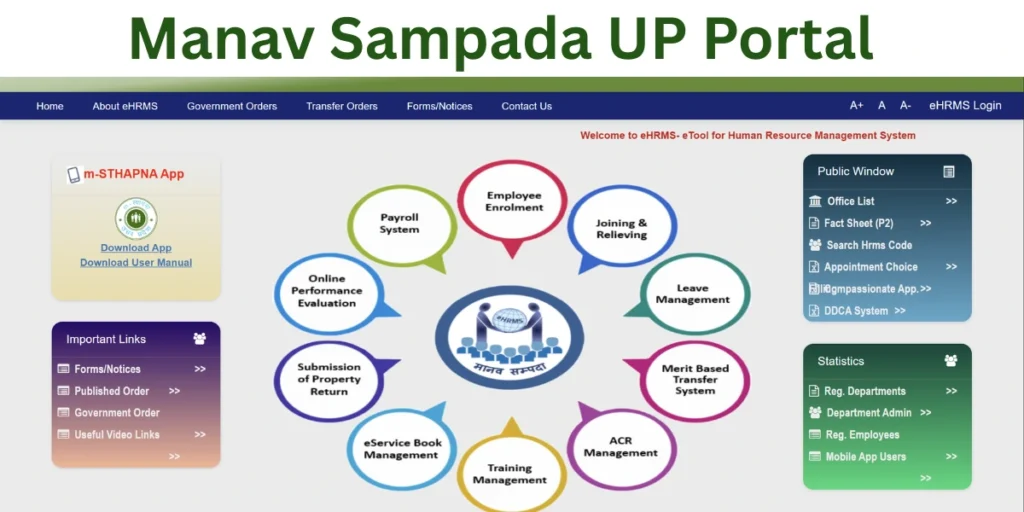
This portal is an excellent digital medium for transparency, time saving and ease of online functioning for the employees. The portal also provides facilities like Sampada Leave Application, Service Book, Basic Education, Pay Slip, Fact Sheet (P2), Search HRMS Code, Registered Department, Forms, Notices, Published Orders, Government Orders and App Download.
Manav Sampada UP
The Manav Sampada Portal is an online portal launched by the Uttar Pradesh government through which government employees can avail various government services. The platform is aimed at modernizing employee management for the state’s government workforce.
Approximately 74 departments in Uttar Pradesh have been linked to this portal. Through this portal, government employees can apply online for appointments, leave, and transfers, all from the comfort of their homes.
Eligibility for Manav Sampada Portal Access
Not everyone can access the Manav Sampada UP portal. Eligibility criteria include:
Primary Requirements:
- Current serving employee of Uttar Pradesh State Government
- Valid 8-digit Employee ID issued by your department
- Official registration in eHRMS database by nodal officer
- Active service status (not suspended or terminated)
Retired Employees:
- Retired government employees can access for pension-related services
- Pensioner ID required
- Limited access to relevant pension modules
Important: There is no self-registration. Your department’s administration creates your profile and provides initial credentials through your nodal officer.
Manav Sampada Portal Registration
You do not have to register in the Manav Sampada Portal, rather a login ID is given to use it, using which you can login to this portal and avail the benefits of government services.
To do this, you will need to contact the NIC, which will then issue you a login ID after a specific process. It should be noted that only government employees can apply for a login ID.
How to Use the Manav Sampada UP Login Portal?
Visit the Official Website: Go to ehrms.upsdc.gov.in, the official website of the Manav Sampada portal UP.
Log In to Your Account: Click on the Manav Sampada UP login option. Enter your employee ID and password.
Access Key Features: Once logged in, you’ll see options for leave application, service records, transfer requests, and other HR tasks.
Apply for Leave: Navigate to the leave management section, select your leave type, and provide the required details. Submit it for approval.
Check Service Records: Use the “Service Book” section to view your digitized records, including career milestones, training details, and promotions.
Notifications and Updates: The dashboard provides regular updates, notices, and alerts from the Manav Sampada UP basic education department or other relevant authorities.
The Manav Sampada UP Portal is an official online Human Resource Management platform launched by the Government of Uttar Pradesh. Employees can instantly access their service records, leave status, and HR policies.

He is a professional blogger, blogging expert, SEO strategist, and founder of Latestsarlariyojana.com. With over 10+ years in the industry, he helps creators and entrepreneurs build successful websites and blogs.